SureColor SC-F7200/F9200 Series: Cleaning the Caps
There has been a change to the cap maintenance procedure, this article will take you through the new cap cleaning process
 Warning: Warning: |
|---|
|
DO NOT use any of the ink cleaner fluid on or around the Cleaning Cap or the Anti-drying Caps.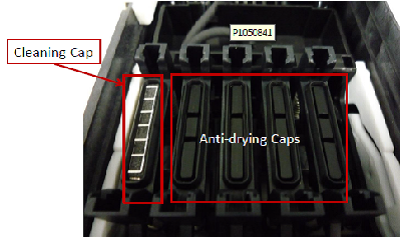
|
-
Move the print head to the maintenance position:
- Press the
 Maintenance button
 - Use the arrow buttons to select Head Maintenance and press OK
The print head will move to the maintenance position
 Note:
Note:The buzzer will sound after 10 minutes if the print head is still in the maintenance position. Press the OK button to reset the buzzer for a further 10 minutes.
- Press the
-
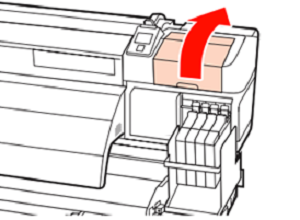
Open the right maintenance door
-
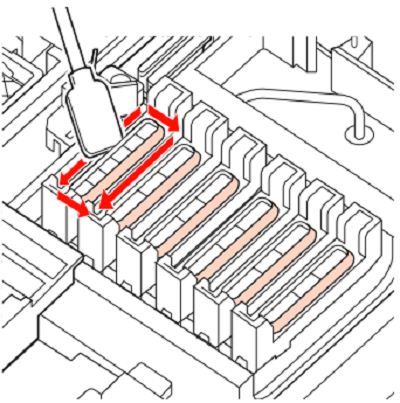
Wipe off any excess ink from the Anti-Drying caps, using a new small cleaning stick.

-
Hold the cleaning stick as shown below and wipe the outer area of all the caps.
-
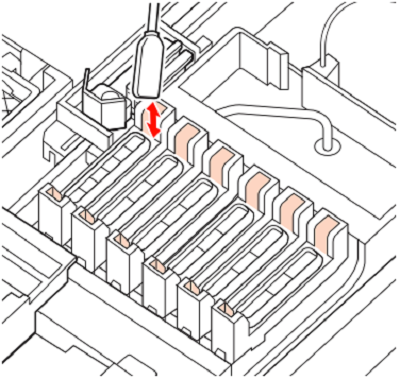
Wipe any ink off the guide section
- After cleaning close the right maintenance cover and press OK twice.
Video Tutorial: Cleaning the Caps
